
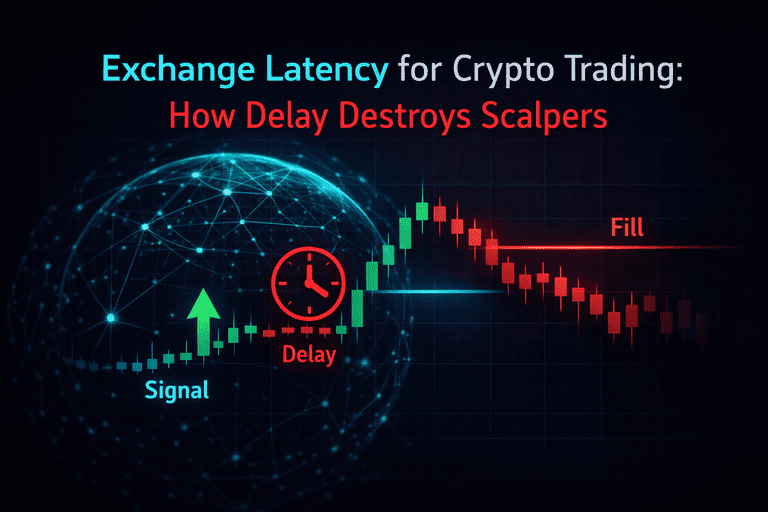
Latency is the most annoying cost in crypto because you can’t “see” it on your chart — you only feel it in your fills.
If you’re a 1 minute scalper, latency is the difference between:
-
getting in at the level you planned, or
-
chasing price after the candle already moved.
It’s also why two traders can click the same setup and get totally different results.
This article breaks down exchange latency in a practical way:
-
what it actually is (there are multiple types)
-
why it matters more for scalpers than swing traders
-
how to measure it without turning into a network engineer
-
what to do to reduce it in real life
What is exchange latency (simple definition)
Exchange latency is the delay between you sending an action and the market recognizing it.
That action can be:
-
placing an order
-
canceling an order
-
modifying an order
-
receiving price updates
And yes — latency can hit you even if your strategy is good. It’s not a “skill issue.” It’s infrastructure and market microstructure.
The 4 types of latency that actually matter
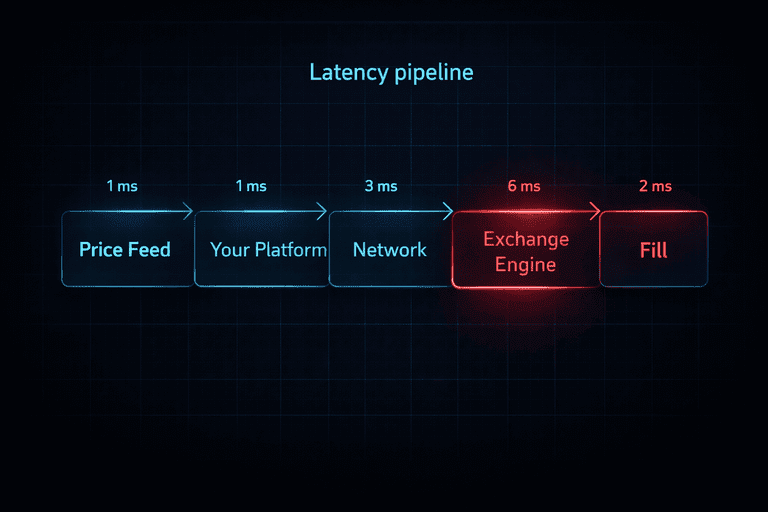
Most people think latency is only “ping.” That’s only one part of the pipeline.
1) Network latency (ping)
Time for data to travel between you and the exchange servers.
This is the classic “ping” number, but it’s not the whole story.
2) Platform latency (UI / app delay)
Even before your order leaves your device, your platform can lag:
-
slow chart UI
-
browser freezes
-
overloaded mobile app
-
delayed button response
3) Exchange matching engine latency
This is the big one: how fast the exchange processes orders inside their system.
Two exchanges can have identical ping but very different matching performance during high load.
4) Market data latency (feed delay)
If your price feed updates late, you’re trading on old information.
This can happen with:
-
delayed websockets
-
overloaded API endpoints
-
chart feeds that lag in volatile moments
Latency often shows up as worse spread and worse execution.
Why latency is deadly for scalpers
Latency hurts scalpers because scalping is built on small margins.
A swing trader can survive a 200ms delay.
A 1-minute scalper might not.
Latency creates:
-
worse fills
-
more slippage
-
missed entries
-
stop-loss slipping harder than expected
-
cancel orders failing (ghost orders / stale orders)
Fees explained:
Fees aren’t your only cost — execution costs can be bigger.
The “latency chain” that causes bad trades
Here’s the actual chain (super important mindset shift):
-
You see a setup
-
Your feed updates (maybe late)
-
You click buy/sell
-
Your platform sends the order (maybe delayed)
-
Network delivers it (ping)
-
Exchange processes it (matching engine)
-
You get confirmation
-
Your fill is at a different price than expected
Even if each step is “small,” total delay can be meaningful.
How to measure latency without overcomplicating it
You want three measurements. Nothing more.
1) Ping to the exchange (basic network check)
This gives you a baseline.
But don’t get hypnotized by it — low ping doesn’t guarantee good fills.
2) “Click-to-confirm” time (real trading UX)
The practical metric:
-
click order
-
measure how long until the exchange confirms
If this spikes during volatility, that’s a warning about platform/exchange load.
3) Slippage consistency during similar conditions
If you trade the same pair at the same time window and one exchange gives consistently worse fills, latency + microstructure are likely involved.
Scalper rule: don’t chase perfect measurements — chase consistent execution.
What causes latency spikes (the usual suspects)
1) Volatility + traffic surges
When markets move fast, everyone piles in at once.
Some exchanges handle this better than others.
During volatility spikes, execution quality matters more than strategy.
2) Liquidation cascades
Perps can go “engine hot.” Order flow becomes chaotic.
3) Your device or browser is the bottleneck
A heavy trading dashboard + 40 Chrome tabs = self-inflicted latency.
4) Bad routing / VPN / unstable connection
Sometimes your “privacy setup” is trading performance’s worst enemy.
(You can be private and fast, but you need a sane configuration.)
5) API vs UI differences
Some exchanges have fast UI but slow API under load, or vice versa.
How to reduce latency (practical checklist)
Here’s your executive plan — minimal fluff, maximum impact.
1) Trade on a venue built for execution
Not every exchange is designed for high-frequency behavior.
Choose exchanges where scalping execution is actually reliable.
2) Simplify your trading setup
-
close unnecessary tabs
-
disable heavy browser extensions
-
use a lighter chart layout during high-volatility windows
3) Avoid dead hours if you depend on speed
In quiet hours, liquidity is thinner, spreads widen, and latency “feels” worse because fills punish you harder.
Better liquidity windows = better fills and less execution pain.
Quiet hours can turn small latency into big slippage.
4) Use execution-appropriate order types
If latency is high and conditions are fast:
-
market orders can slip hard
-
aggressive limits can miss
-
you need rules: when to use which
(Later we can publish a separate article for “Post-only / IOC / Reduce-only” and link both ways.)
5) Add a “latency kill switch” to your routine
A simple policy:
-
if click-to-confirm feels slow today
-
if cancels don’t register instantly
-
if your fills are consistently worse than normal
→ reduce size, trade only A+ setups, or stop for that session
That’s grown-up trading.
Use a fast pre-trade checklist to avoid trading during bad execution conditions.
Latency vs spread vs slippage (how they connect)
Latency usually doesn’t hurt alone. It amplifies other costs:
-
latency + wide spread = instant negative PnL
-
latency + volatility = slippage spikes
-
latency + stop triggers = nasty exit fills
So think of latency as a multiplier. If your environment is already risky, latency makes it worse.
Recommended next step
If you’re scalping seriously, your edge isn’t only your setup — it’s your execution pipeline.
Do this:
-
Track your worst fill sessions
-
Compare exchange behavior during those sessions
-
Trade more during high-liquidity windows
-
Filter trades when execution is ugly
See my top exchanges for scalping (fees + spreads + execution).
FAQ: Exchange Latency for Crypto Trading
Is low ping enough to guarantee good execution?
No. Ping measures network travel time, but your real execution also depends on platform delay, market data delay, and the exchange’s matching engine performance under load.
Why do my fills get worse during big moves?
Because volatility increases order flow and makes liquidity pull back. Even small delays become expensive when price is sprinting.
Can latency cause stop-loss slippage?
Yes. If your stop triggers during a fast move, the conversion to a market-like execution plus any delay can produce worse-than-expected fills.
Is trading on mobile slower than desktop?
Often yes, especially if the app is heavy or your connection is unstable. Mobile can be fine — but during fast markets, small UI delays can matter for scalpers.
What’s a simple sign I should stop trading due to latency?
If your cancel/replace feels slow, confirmations lag, and your fills are consistently off compared to normal conditions, that’s your “execution quality alarm.”
Does latency matter for spot trading too?
Yes, but perps scalping tends to feel it more because of higher volatility bursts, liquidation flows, and more aggressive order flow.
Can a VPN increase latency?
Yes, depending on routing. Some VPN routes add delay or jitter. If you want privacy and speed, you need a stable route and not a random “bounce across the planet” connection.
How do I explain latency in one sentence?
Latency is the time gap between what you see and what the exchange processes — and scalpers pay for that gap.
1 thought on “Exchange Latency for Crypto Trading: How Delay Destroys Scalpers”