

How to Use the Crypto Performance & Volume Analyzer (Out-Under Performed Finder)

Welcome to your ultimate crypto market scanner — built to help traders instantly spot the strongest and weakest performers across 200+ USDT pairs. Whether you’re day trading, swing trading, or refining a 5-minute scalping strategy, this tool gives you a clean edge by showing exactly what’s moving — and what’s stalling — in the market.
If you’re newer to fast-paced trading, it also pairs perfectly with this crypto scalping beginner’s guide, helping you turn raw market data into structured, confident decisions instead of guesswork.
What This Tool Shows You
Columns explained:
- Symbol – The crypto pair traded against USDT (BTCUSDT, ETHUSDT, etc.).
- 24h % – Price change over the last 24 hours.
- Perf vs BTC – Shows how well the coin performed compared to Bitcoin.
- 24h Volume – Total trading volume in the last 24 hours, shown in millions (M).
- Last Price – Most recent trading price.
- Status – Highlights if a coin outperformed or underperformed the market.
⚙️ Customization Features
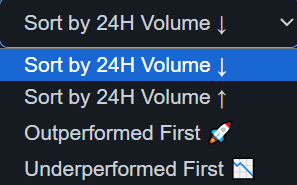
You’ve got full control over how data is displayed:
- Sort Order:
- 🔼 24h Volume Asc/Desc – great for spotting where liquidity is growing.
- 🟢 Outperformed First – brings the strongest coins to the top.
- 🔴 Underperformed First – great for finding early reversal candidates.
- Performance Threshold:
Adjust the “outperform/underperform” sensitivity.
Example: Set 3% for a tight comparison to BTC or 10% to isolate only the strongest movers. - Search Bar: Quickly find any specific pair by name.
How Traders Use This Tool
1. Spot Market Leaders
Look for altcoins strongly outperforming BTC. If several coins from the same sector (AI, Gaming, DeFi) start outperforming at once, it may indicate a sector rotation.
2. Find Volume Confirmations
Use the high-volume outperformer list to catch coins with both strength and liquidity — ideal for scalpers and day traders.
3. Identify Reversal Opportunities
When a coin is heavily underperforming BTC, it often snaps back quickly once the market turns bullish again, creating potential reversal setups.
4. Market Health Snapshot
If most coins are outperforming BTC → sentiment is broad and bullish.
If most are underperforming → sentiment is bearish.
5. Hourly Auto-Update
The scanner automatically refreshes every hour, giving you up-to-date market context.
Pro Tips for Power Users
- Combine the scanner with the
RSI Overbought/Oversold Detector
for ultra-precise entry timing. - Revisit the tool multiple times a day to see which coins maintain leadership — consistent outperformers usually trend longer.
- Look for sector patterns (AI, RWA, Gaming, DeFi).
When several coins in a sector outperform BTC at once, momentum is shifting.
Recommended Tools to Use With This Analyzer
- Long vs Short Ratio – measure real-time trader sentiment.
- Crypto Fear & Greed Index – get a macro view of market emotions.
- EMA / SMA Strategy Guide – great for confirming trend strength.
- Crypto Market Opening Times – trade when volume peaks.
Want a Complete Trading Framework?
For a full trading plan — entries, exits, indicators, and chart examples — read the full guide here:
2 thoughts on “How to Use the Crypto Performance & Volume Analyzer”